
If you’ve ever sent a message from your iPhone and noticed that the text bubble is green instead of blue, you may have wondered what it means. This is one of the most common questions among iPhone users, especially those who are new to Apple’s messaging system.
The color of a message bubble isn’t random it tells you how your message was sent. A green text bubble usually means the message was sent as a standard SMS or MMS instead of Apple’s iMessage service.
Understanding the difference between green and blue messages can help you troubleshoot messaging problems and know which features are available during your conversations.
What Does Green Text Mean on iPhone?
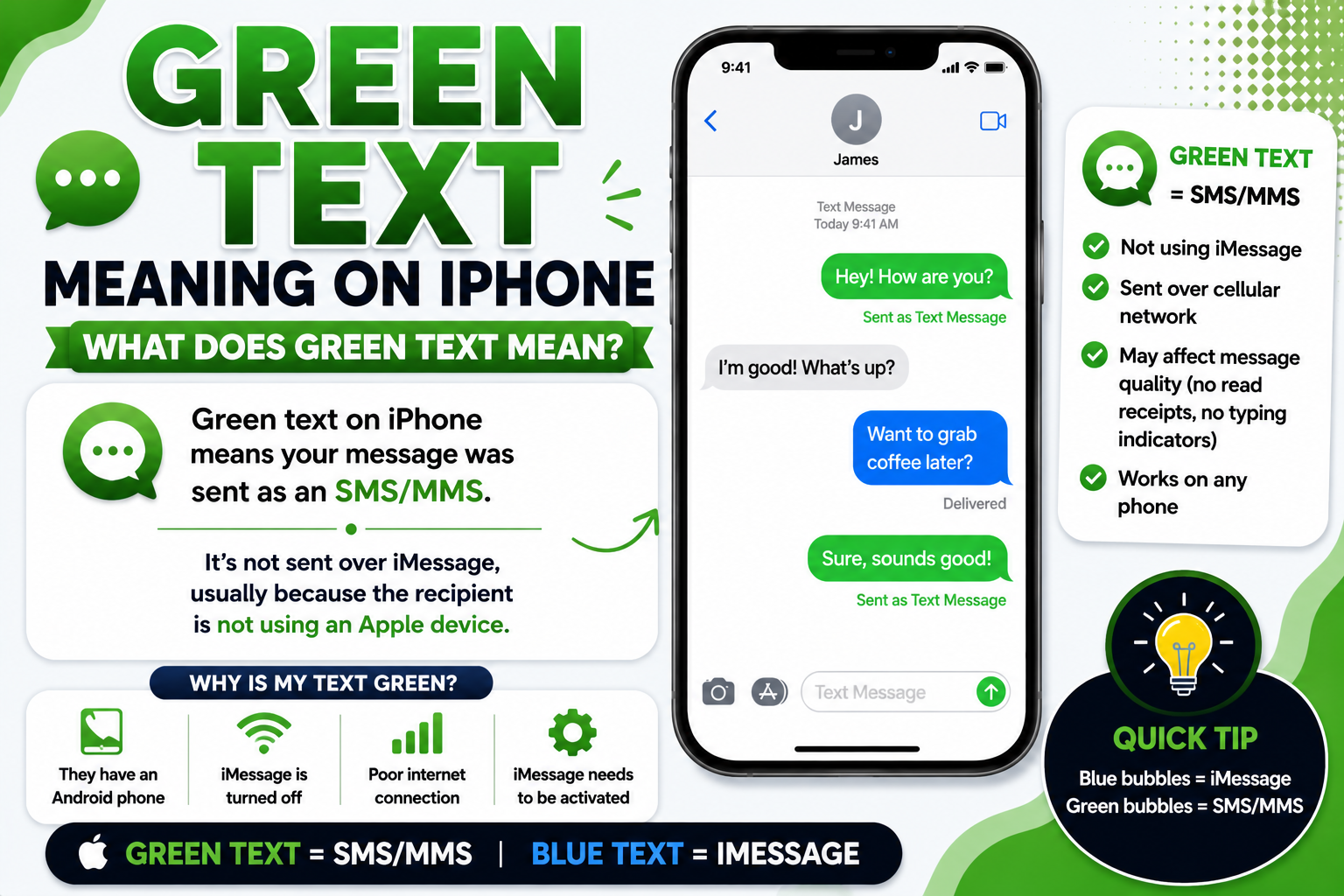
The primary meaning of a green text bubble is:
The message was sent using SMS or MMS instead of iMessage.
Unlike blue messages, green messages travel through your mobile carrier rather than Apple’s internet-based messaging service.
Featured Snippet
A green text bubble on an iPhone means your message was sent using SMS or MMS through your mobile carrier instead of Apple’s iMessage service. This usually happens when you’re texting an Android phone, iMessage is turned off, or either device doesn’t have an internet connection.
Quick Reference Table
| Bubble Color | Meaning | Sent Through | Internet Required |
|---|---|---|---|
| Blue | iMessage | Apple Servers | Yes |
| Green | SMS/MMS | Mobile Carrier | No (SMS) |
Green Text Meaning in Everyday Messaging
In most situations, a green text simply means you’re using regular text messaging instead of iMessage.
Common reasons include:
- You’re texting an Android phone.
- iMessage is disabled.
- No internet connection.
- Apple’s iMessage servers are temporarily unavailable.
- The recipient has turned off iMessage.
- The recipient switched from iPhone to Android.
A green message does not automatically mean you’ve been blocked.
Green Text Meaning When Texting Android Users
If you’re sending a message from an iPhone to an Android device, your message will almost always appear green.
This is completely normal because Android phones don’t use Apple’s iMessage service.
Example:
You: “See you at 7.”
Bubble Color: Green
Meaning: Sent as SMS.
Green Text Meaning in iPhone-to-iPhone Conversations
Sometimes two iPhones also show green messages.
This usually happens because:
- iMessage is turned off.
- One phone isn’t connected to Wi-Fi or mobile data.
- The recipient disabled iMessage.
- Apple’s servers are temporarily unavailable.
Green Text Meaning on WhatsApp
Unlike the iPhone Messages app, WhatsApp message colors do not indicate SMS or iMessage.
WhatsApp always sends messages over the internet.
Green text bubbles inside WhatsApp are simply part of WhatsApp’s design and do not mean SMS.
Green Text Meaning on Instagram
Instagram Direct Messages don’t use blue or green bubbles to indicate message type.
If someone mentions “green text,” they’re almost always referring to the iPhone Messages app—not Instagram.
Green Text Meaning in Relationships
Many people wonder whether a green text means someone blocked them.
In most cases, the answer is no.
Green messages usually happen because:
- The other person switched to Android.
- iMessage is unavailable.
- They turned off iMessage.
- There’s a network issue.
If someone blocks your phone number on an iPhone, message color alone is not reliable evidence.
Green Text Meaning in Professional Communication
If you’re messaging coworkers or clients from your iPhone, green messages simply indicate that the conversation is using SMS instead of iMessage.
Professionally, this usually has no impact unless you rely on iMessage features such as:
- Read receipts
- High-quality media sharing
- Message reactions
- End-to-end encryption
- Typing indicators
Why Are My iPhone Messages Green?
Here are the most common reasons:
1. You’re Texting an Android Phone
The most common reason.
2. iMessage Is Turned Off
Go to:
Settings → Apps → Messages → iMessage
If it’s off, messages will be green.
3. No Internet Connection
iMessage requires Wi-Fi or mobile data.
4. Apple Servers Are Down
Temporary outages can force messages to send as SMS.
5. The Recipient Disabled iMessage
If they turned off iMessage or changed phones, you’ll likely see green bubbles.
Blue vs Green Text Messages
| Feature | Blue (iMessage) | Green (SMS/MMS) |
| Uses Internet | Yes | No (SMS) |
| Uses Mobile Carrier | No | Yes |
| Read Receipts | Yes (optional) | No |
| Typing Indicators | Yes | No |
| Message Effects | Yes | No |
| High-Quality Photos | Yes | Limited |
| End-to-End Encryption | Yes | No |
How to Change Green Messages Back to Blue
Try these steps:
- Make sure iMessage is enabled.
- Connect to Wi-Fi or mobile data.
- Restart your iPhone.
- Confirm the recipient also uses iMessage.
- Update iOS.
- Sign out and back into your Apple Account if necessary.
Real-Life Examples
Example 1
You text your friend who has an Android phone.
Bubble Color: Green
Reason: SMS.
Example 2
Your internet stops working.
Bubble Color: Green
Reason: iMessage can’t connect.
Example 3
Your friend switches from iPhone to Android.
Bubble Color: Green
Reason: They’re no longer using iMessage.
Example 4
Apple’s iMessage servers experience an outage.
Bubble Color: Green
Reason: Messages temporarily fall back to SMS.
Example 5
You accidentally disable iMessage.
Bubble Color: Green
Reason: Messages are sent through your carrier.
FAQs
What does a green text mean on an iPhone?
A green text bubble means your message was sent using SMS or MMS instead of Apple’s iMessage service.
Why are my messages green instead of blue?
Common reasons include texting an Android phone, iMessage being turned off, poor internet connectivity, or a temporary iMessage outage.
Does green text mean I’m blocked?
No. Green text alone does not mean you’ve been blocked. There are several other reasons messages may appear green.
Can iPhone users send green texts to each other?
Yes. If iMessage is unavailable or disabled, messages between two iPhones may also appear green.
Does green text cost money?
If your mobile plan charges for SMS or MMS, green messages may count against your texting allowance. Many plans now include unlimited texting.
Can I make green texts blue again?
Yes. Turn on iMessage, connect to the internet, and make sure the recipient also has iMessage enabled.
Why are photos lower quality in green messages?
SMS and MMS have file size limitations, which can reduce image quality compared to iMessage.
Are green messages secure?
SMS and MMS are generally not end-to-end encrypted like iMessage.
Why did my messages suddenly turn green?
This can happen if iMessage is disabled, your internet connection is unavailable, Apple’s servers are down, or the recipient is no longer using iMessage.
Is green text bad?
No. Green text simply indicates that the message was sent using SMS or MMS instead of iMessage.
Conclusion
A green text on an iPhone simply means your message was sent as SMS or MMS through your mobile carrier instead of Apple’s iMessage service. This most commonly happens when you’re texting an Android phone, iMessage is turned off, or an internet connection isn’t available.
While green messages don’t include some of iMessage’s advanced features such as read receipts, typing indicators, and end-to-end encryption they still allow you to send and receive standard text messages reliably. By understanding the difference between green and blue message bubbles, you can quickly identify how your messages are being delivered and troubleshoot common messaging issues when needed.